





Bicycles/Scooters
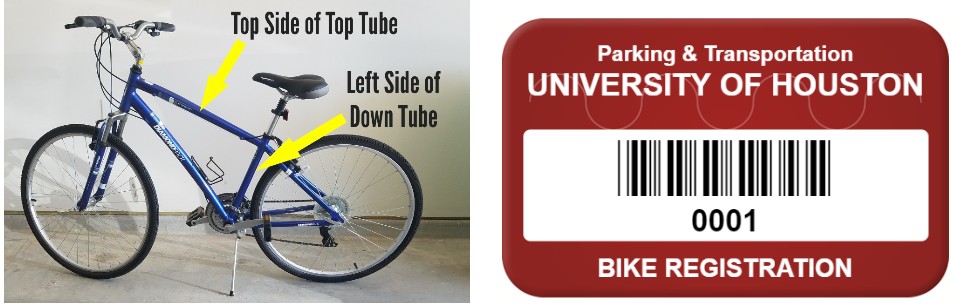
Students, faculty and staff who have a bicycle or scooter on campus are required to register it. Registration takes only minutes to complete and is free. A registration sticker will be provided and should be placed on the bicycle/scooter. If the bicycle/scooter is ever lost or stolen, the University will have the serial number and other identifying information. If it is recovered, this information makes it much easier to return it to its rightful owner.
Here is the University's Bicycle and Scooter Policy.
Frequently Asked Questions
-A serial number is required to register your bike or scooter.
-Common bike serial number locations: View here
-For scooters, check the following locations:
- Underside of the deck (most common)
- Stem or handlebars (near the fold/hinge)
- Near the charging port
- Side or rear of the deck
- Scooter mobile app (device settings)
- Original box or paperwork
Registration is free and required. It helps with:
- Theft recovery
- Proof of ownership
- Campus safety
- Bike rack planning
- Theft deterrance
- Insurance claims
How to Register a Bicycle/Scooter
- Log in to your AccessUH account.
- Select "myParking Account."

- Click the "Order Permits" icon.
- Review the Rules and Regulations, then click "I agree with the terms of service."
- Choose the appropriate Registration Permit for your bike or scooter.
- Click "Add Vehicle."
- In the "Plate #" field, enter your bike or scooter's serial number. Click here to view common serial number locations. Random or fabricated serial numbers should not be entered.
- For "State," select Texas.
- For "Make," choose "Other."
- Select the color that best matches your bike or scooter.
- Choose the appropriate Body Type.
- Click "Add" and then "Confirm."
- Upload a photo of your bike or scooter using "+ Add Attachment."
- Click "Confirm."
- Visit the Parking and Transportation customer service office in the Elgin Street Garage (Suite 110) to pick up your registration decal. No appointment is required.
Where to Place Registration Sticker


Common Bike Serial Number Locations
